


The moment you open your laptop, you realize one screen can barely keep up with everything on your plate. Emails, reports, research tabs, and messaging apps all compete for attention, leaving your focus scattered. That is where a triple-screen laptop extender changes the game. By giving each task its own space, you no longer juggle windows or constantly Alt-Tab between programs. You can see everything immediately, make decisions more quickly, and stay in control of your work, transforming a simple laptop into a powerful, multitasking workstation.
How Can Triple Screens Transform Your Workflow?
Imagine you are analyzing market trends while tracking competitor updates and drafting your strategy. On a single screen, you constantly toggle between spreadsheets, websites, and notes, losing context and slowing your progress.
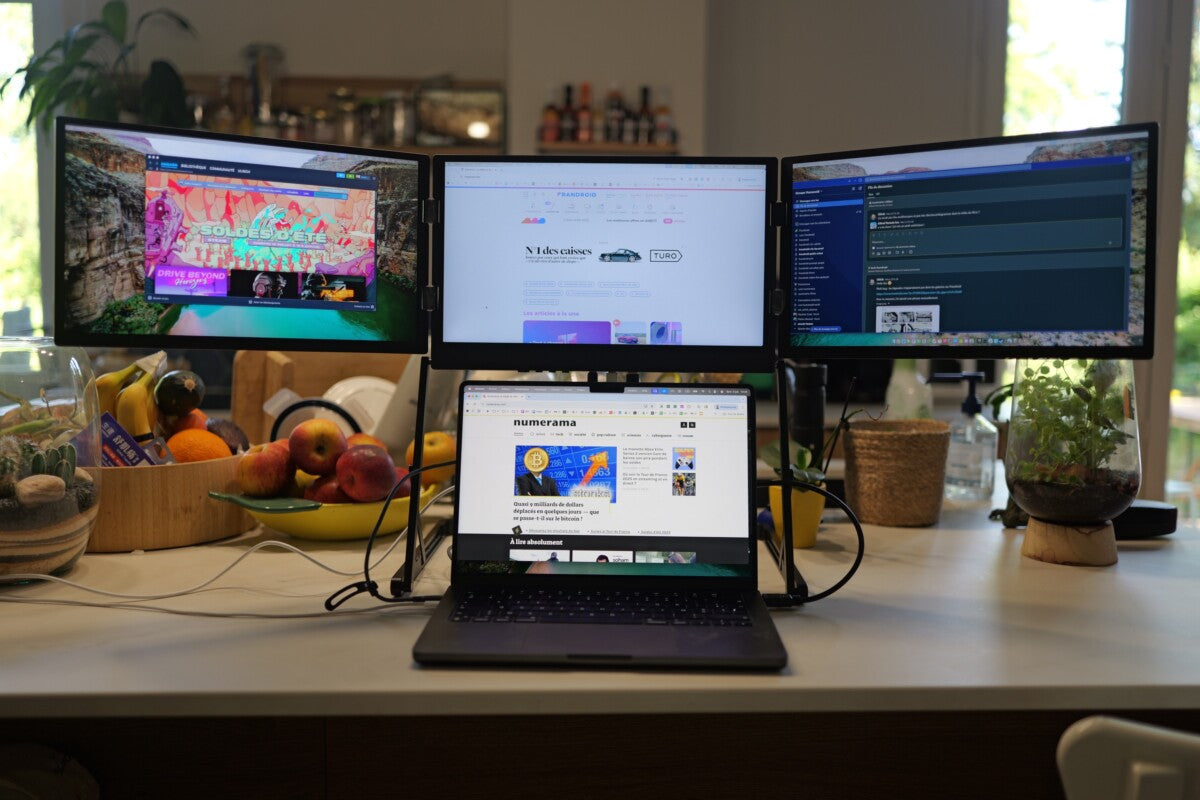
A triple-screen laptop extender from Aura Displays completely transforms the way you work. You can display live competitor data on the left panel, your main report in the center, and a feed of market news or team messages on the right. Each screen becomes a dedicated “zone,” allowing your brain to process tasks efficiently without switching between overlapping windows.
This setup does more than reduce tab-switching. You can spot trends on one screen while updating your strategy on another without breaking focus. Professionals like analysts, project managers, and researchers can work faster and make smarter decisions because the layout mirrors how your mind organizes information.
With three screens, your workday becomes more organized. You can monitor multiple projects side by side, react quickly to updates, and maintain clarity throughout even complex workflows, something a single monitor rarely allows.
Why Does Working on Three Screens Feel Different?
1. Keep Multiple Tasks Visible Immediately
With a single monitor, you often resize or stack windows to fit everything, which slows you down. With three screens, your workspace is clear, stable, and organized. Documents, spreadsheets, and reference materials stay in view, helping you maintain context effortlessly.
2. Manage Communication Without Interruptions
Video calls, messaging apps, and client chats often dominate a single screen. With three displays, your main tasks remain in the center while communication tools occupy the side panels. This allows you to stay connected without disrupting your workflow.
3. Seamlessly Work Across Multiple Tools
Different professions require juggling multiple platforms simultaneously:
-
A designer can keep editing software centered, asset libraries on one side, and color references on the other.
-
A student can write an assignment while viewing lecture notes and checking sources.
-
A project manager can track a live dashboard while monitoring team updates and documents.
If you have experience with a dual-screen laptop, you already understand how extra visual space improves productivity. Moving to a triple-screen setup expands this capability, giving you even more zones to manage tasks efficiently and maintain workflow clarity.
Advantages of Using a Triple-Screen Laptop Extender
● Clearer Workflow
By separating tasks across multiple displays, your eyes and brain can focus on what matters most. You no longer waste time hunting for windows or losing your place. This clarity helps you complete tasks faster and with fewer mistakes.
● Portable Multi-Screen Setup
Aura Displays designs extenders to travel with you. They attach directly to your laptop, fold flat, and fit easily into your bag. Whether you are switching between home, office, or coworking spaces, your setup remains consistent and ready to use anywhere.
With a triple-screen setup, you expand the workspace you are used to with the best portable monitor for Laptop, letting you keep multiple projects, research tabs, and communication tools visible at once so you can work more efficiently and stay on top of your tasks.
● Faster Multitasking
With everything visible immediately, you spend less time switching between applications and files. Over a full workday, this efficiency adds up, letting you handle more complex projects without extra effort.
● Adaptable Across Professions
Writers, analysts, designers, developers, and students all benefit uniquely from a triple-screen setup. Each field can arrange screens to match workflow needs, resulting in smoother task management and better access to essential tools.
How Triple Screens Compare to a Single Monitor
A single monitor offers simplicity, but it forces tasks into layers, requiring constant switching and adjustments. This slows workflow, fragments attention, and increases the chance of errors.
In contrast, a triple-screen extender provides a broader, organized workspace. You can monitor multiple sources, reference documents, and communicate simultaneously without compromising focus. Segmented panels help you feel in control, reduce clutter, and maintain a steady workflow even during demanding projects.
Why Aura Displays Provides an Effective Multi-Screen Solution ?
Aura Displays builds extenders with practicality, mobility, and comfort in mind. Panels open smoothly, maintain consistent color across all screens, and provide wide viewing angles for long sessions. The setup adapts to any environment, whether at home, in a shared office, or while traveling.
Three distinct displays allow you to organize tasks intuitively: keep research on one screen, main projects in the center, and communication tools on the other. This layout reduces distractions, minimizes mental load, and helps you tackle complex work efficiently, all while maintaining focus and clarity that a single monitor rarely offers.
A triple-screen laptop extender does not just give you extra space; it redefines how you work. By distributing tasks across three dedicated zones, you reduce interruptions, maintain focus, and handle complex workflows effortlessly. Once you experience this setup, even your most challenging projects feel manageable, and your laptop becomes a true compact command center.






Share: