


When you are juggling spreadsheets, client calls, chat windows, and creative tools all immediately, one screen often is not enough, and even two can feel tight. That is where the Triple Screen Laptop Extender from Aura Displays makes working on your laptop feel easier and more organized. It is not just about adding more displays; it is about redesigning how you see, manage, and complete work every day.
Why Three Screens Trump Two?
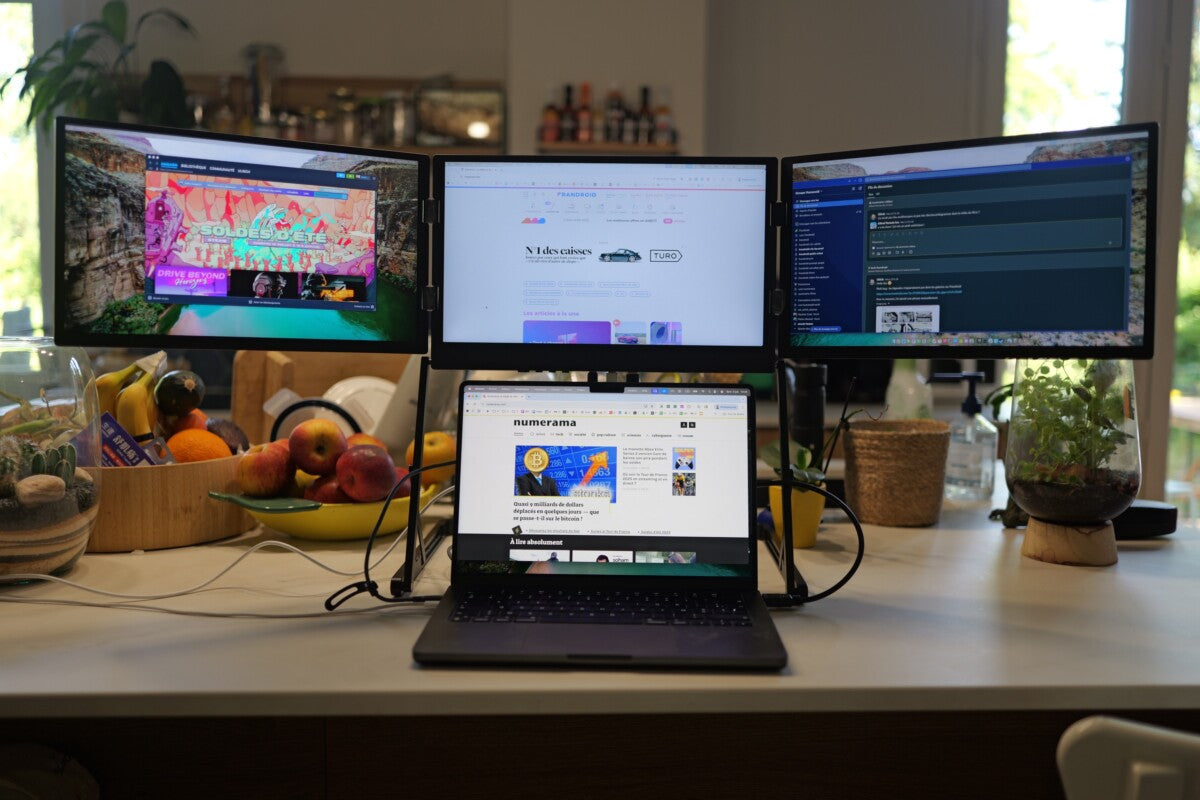
You have probably used a dual-screen laptop setup before, and you know how much smoother your workflow becomes when you can see more immediately. But going from two to three screens unlocks a different level of task management. With two side panels flanking your primary laptop display, you can dedicate each screen to a purpose: one for communication, the center for focused work, and the third for reference materials. That means fewer interruptions and less time constantly rearranging windows.
Here is what makes this setup especially effective:
Improved Multitasking That Feels Natural
With just one extra screen, you still end up flipping between apps. Adding a third screen allows you to see everything at once. Whether you’re checking dashboards, tracking live data, or comparing documents, it’s much easier to keep everything under control and stay focused.
Better Organization of Your Digital Workspace
With three separate screens, you can organize your workspace the way you want: keep reference tabs visible, put your main task front and center, and have communications open on the side. This setup makes it easier to stay focused without constantly switching between windows. Using a laptop screen extender helps even more by keeping everything you need within easy reach.
Real-World Scenarios Where Triple Screens Shine
Think about how often you switch between tabs during a busy work session. With multiple monitors, professionals find they get more done because they spend less time hunting for the windows they need. If you are working remotely, you can have a video call on the left screen, your main project in the center, and emails or chat on the right. Adding a third screen makes all of this even easier to manage.
For data pros: chart live figures on one screen while comparing results across sheets without losing focus.
For creatives: spread design tools and previews across three panels so inspiration and edits coexist visually.
How Aura Displays Sets It Apart
Aura Displays’ triple monitors are built to be strong, practical, and portable.
-
Single-Cable Setup
Most designs use USB-C connectivity, letting video, power, and data stream through minimal hardware.
-
Premium Screens
Full High-definition panels with wide viewing angles make content clear and consistent across the full view.
-
Portable Form Factor
Unlike stationary desk setups, these extenders fold flat and travel with you, perfect for working from cafes, hotels, or client sites.
-
Compatibility
Works with macOS, Windows, and many mainstream laptops, so you can use it with your current machine without complex adapters.
Dual Screens vs. Triple: What You Really Gain
A second display already reduces how often you switch between windows and gives your laptop a bit more space to work with. Even adding one extra screen can save time by cutting down on unnecessary clicks and task switching. The third screen is where things really change you stop juggling windows and can focus on your work with everything visible and in place.
Rather than dividing your attention between two screens, your work spreads out more naturally. Each task stays visible, transitions feel easier, and your workflow follows the way you already think and move through your work.
The Experience You Notice Every Day
Once you try a three-screen setup, the difference is obvious. You’re not searching for hidden windows, resizing applications to make space, or losing focus when switching between tasks. It feels like moving from a cramped desk to a wide, open workspace where everything has its place. Plus, because the setup travels with your laptop, you’re not tied to a single desk or office; you can work comfortably anywhere.
Whether you are editing content, replying to quick messages, or working through detailed data, a three-screen setup from Aura Displays makes everything feel easier to handle. Once you get used to having everything in view, going back to fewer screens just feels frustrating. When all your work is laid out clearly, it’s hard to imagine trying to manage with less space.






Share: